Founded in 2012, SpigotMC.org is home to the community behind the biggest Minecraft server software projects and provides a place for everyone involved with Minecraft servers to connect with each other whether they seeking help and support or sharing and showcasing their work. We provide a web forum, chat room and wiki for providing support as well as project hosting for content creators and hope that you too will become involved in this extensive and growing community of more than 300,000 members.
Create a Maven Project
1. From Eclipse to create the Maven project
2. Use a template to create a Maven Project
3. Configure the Maven Project
“Group Id” is the name of a Java Package “Artifact Id” is the name of the Plugin run in Minecraft “Version” is the software version “Packaging” is the output type
This file is needed when loading the plugin in Bukkit. This file contains the basic information about the plugin.
Right-click in src/main/resources to choose New → File
Add plugin information:
JSON
name: {Plugin Name}main: {Package Name}.{Main Class Name}version: {Version Number}
Add API doc to the Eclipse IDE
It is convenient to view the API information when adding the API to the Eclipse IDE.
Choose the Dependency Library in Maven Dependency
Right-click to choose Properties, and then choose Javadoc Location. Add https://jd.bukkit.org/
Add onEnable() and onDisable() method
Java
packagecom.github.yinquan.testplugin;importorg.bukkit.plugin.java.JavaPlugin;publicclassPluginMainextendsJavaPlugin{@OverridepublicvoidonEnable(){getLogger().info("onEnable has been invoked!");}@OverridepublicvoidonDisable(){getLogger().info("onDisable has been invoked!");}}
onEnable — Called when this plugin is enabled
onDisable — Called when this plugin is disabled
getLogger().info(String msg) — If the logger is currently enabled for the INFO message level the given message is forwarded to all the registered output Handler objects.
Build the Plugin Project
In Eclipse, click Run As → Maven install
Finish building, and the Console will print the information
The archive file ({ProjectName}.jar) will be obtained.
Deploy the Plugin to Minecraft
Copy the archive file built by Eclipse to plugins folder in Spigot Server Folder
Run the Spigot Server
When the server starts running, the text is printed in cthe onsole of the server:
What steps to convert the program from the code to the executable file?
Pre-compile
cpp hello.c > hello.i
gcc -E hello.c -o hello.i
delete all “define” and replace all the macro definition
handle all condition pre-compile: #if, #ifdef,#elif,#else,#endif
handle #include: insert the file to the code. This is recursive.
delete all comments of the code
add the line number and the file mark. This will help compiler produces the line number used in the debug and can show the line number when compiler produces the error or warning.
remain all #pragma since the compiler will use it.
Compile
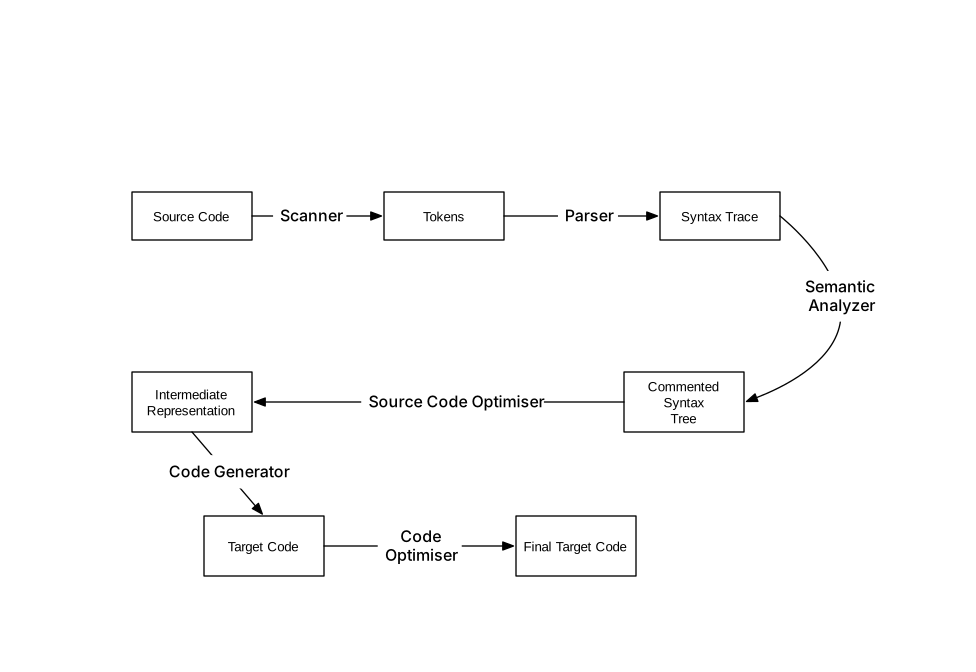
The process of the compiler produces the assembly code with the file pre-compiled by Scanner, Parser, Grammar Parser, Semantic Parser and Optimizer.
gcc -S hello.i -o hello.s
or directly use:
gcc -S hello.c -o hello.s
Assemble
The Assemble can transfer the assembly language to the machine language according to reference table recorded the relation between the assembly and the machine code.
You can use the following command to produce the object the machine can recognize:
gcc -c hello.s -o hello.o
Link
It produces an executable file to link all object files.
How does the compiler work?
The font of compile
Scanner and Parser
The Parser will scan the code with “Finite State Machine” to crop that code into some tokens.
These tokens are classed by:
KeyWord
Identification
Literal (numbers, string)
Special Symbol
These tokens are stored in a symbol table.
The program called lex can implement this function. It can crop the string inputted by the user into tokens according to some rules set by the users. So the parser doesn’t need to develop, the programs only change rules based on their requirement.
Especially, The macro and the file replacement are in the pre-compile for the C programming language.
Grammar Parser
The syntax tree is built by analyzing the token produced by the scanner. The process uses the Context-free Grammar
The syntax tree is the tree whose node is the expression. The symbol and number are min expression, those aren’t made from other expression, are as the leaf of the whole tree. While analyzing the grammar, the priority and the meaning of a more arithmetic symbol is ensured.
If the expression is illegal, the compiler reports the failure in the grammar parser.
The tool called yacc is grammar parser tools. It is called as Compiler Compiler.
Semantic Parser
The meaning will be explained in the semantic Parser. The semantic parser checks the semantic of statements.
Semantic contains two aspects:
Static
The semantic is ensured during compiling.
It contains the match of the identification and the type.
Dynamic
The semantic is ensured during running
Through semantic analyzing, all nodes in the syntax tree were marked type. If the type needs auto-transformation, the semantic analyzing program will insert transforming node to the syntax tree.
Build the Internal Language
The Source Code Optimizer converts the optimized code to the Intermediate Code.
The intermediate code is close to machine code, but it doesn’t depend on any platform. For example, it doesn’t contain any size of data, the address of the variable, the name of the register.
The Intermediate Code is as an Internal Language. It can cross any platform and make the compiler becomes two parts: The front – has one intermediate code The back – has more implementation for different platforms.
The back of compiler
Generate the machine code
The Code Generator translates the intermediate code to the machine code. This process depends on the hardware of the certain machine. The different machine has different bytes, different registers, and different data size.
Target Code Optimizer
Finally, the Target Code Optimizer optimizes the machine code generated by Code Generator.
Then, the object code that is the machine code is linked to an executable file.
How does the linker work?
What kind of work does the linker complete?
relocating the address of the object when the code changes
replacing the symbol stood for the real address in the assembly language
The symbol in the assembly language can stand for an address of a variable or a function.
joining all modules to generate an executable file
An object file contained machine code called a module. It is communication problem to join all modules.
All modules communicate each other with symbols. And joining process is called Linker
Static Linker
The content of linker is to handle well all reference and makes all modules connecting perfectly.
The process of linking is:
Address and Storage Allocation
Symbol Resolution
Relocation
The linker can modify the address used as the placeholder of the symbol to the real address. This process is called Relocation. Every address used as the placeholder is called Relocation Entry
Because the transferring speed is different, you must distinguish different bus (north bridge and south bridge)
CPU
From SMP (Symmetrical Multi-Processing) to Multi-core Processor.
What problem the Computer Operating System want to solve?
CPU
The CPU is as the resource to Operating System. The system can allocate and control this resource. If the computer needs to do something, it will need this resource. Otherwise, the task cannot be run.
The Operating System handle the CPU allocation. It controls every process’s time.
The Operating System can force the CPU resource into the process needed. This is called Preemptive
Device
The Operating System will hide the detail of hardware. The invoker only uses the simple object to operate the various hardware.
The Operating System classify the various hardware and unify the operation.
Memory
The memory is the important resource. The process can be run only to get CPU and memory.
The memory usage should be considered as effectiveness, safe, hiding detail.
Virtual Memory can implement these features. However, the memory only is expressed as the physical memory. The virtual memory must convert to the physical memory by the special way.
segmentation:
The segmentation can solve the safe and hiding detail, but it isn’t effective. The one segmentation is for a whole process. Finding the suitable size is important for the segmentation.
pages:
The page is that memory can be divided into the fix size page. The size of every page is decided by hardware. Or the selection provides by hardware, and the operation system can choose.
As the general, the 4K is normal size for a page.
The page can be defined as Virtual Page in the virtual memory, Physical Page in the physical memory and Disk Page in the Disk.
If you want to share a physical page, you only let the virtual pages map to that physical page. The data in that physical page will be shared with these virtual pages.
Safe
A page can be set a security level only by the operating system.
The MMU, the physical department, will convert the virtual memory provided by a user to the physical memory managed by the operating system.
Thread
The Basic of Thread:
Lightweight Process. The minimum unit of the program running.
The thread contain, TID (thread id), PC, register, heap
Sharing the resource of the process, code segmentation, data segmentation and process heap, file opened, signals
The situation used thread:
The things needed to wait or calculate
The program need to run in multithread
The multi-thread can show the maximum power of the multi-core process
Sharing the data of the process
The private resource of the thread:
stack
Thread Local Storage
register
Thread Private
Thread Share
Local Variable
Global Variable
Function Argument
Data in Heap
Static Variable in Function
Code
File opened
Thread Schedule:
Running: The current thread is running
Ready: The current thread can run, but the resource of CPU already has been used.
Waiting: The current thread is waiting for happening an event ( I/O or async) and can’t run
Priority Schedule:
Deciding the order of the thread. Every thread has priority itself.
Round Robin:
Every Thread only own the time slice of the CPU for a while. If the time slice is over, the Thread will give up running.
Thread Automatic Schedule: IO Bound Thread
The time it takes to complete a computation is determined principally by the period spent waiting for input/output operations to be completed. CPU Bound Thread
The time for it to complete a task is determined principally by the speed of the central processor: processor utilization is high, perhaps at 100% usage for many seconds or minutes. Interrupts generated by peripherals may be processed slowly, or indefinitely delayed.
IO Bound Thread is easy to get the high priority than CPU Bound Thread
Starvation
The CPU always run the high priority thread, the low priority thread never chances to run.
For solving starvation, the low priority thread will run as long as this thread waits for a long time. Preemption
When a thread consumes its time slice, it will be forced to give up running and get into ready status.
Linux Thread: Task
In Linux, the process and the thread all is as the task. The task can share the memory. The thread Process : fork + exec Thread : clone + exec
The Thread Safe:
Competition and Atomic
If the operation of a system isn’t atomic, it is easy to happen mistake when applying a resource competed (like memory). When facing this situation, we must use other ways to ensure the operation is atomic.
Lock and Async
The lock is a way that ensure the operation must be atomic.
Before accessing the resource, the thread should acquire a lock and release this lock after accessing.
Binary Semaphore
The semaphores which are restricted to the values 0 and 1 ( or locked/unlocked, unavailable/available) are called binary semaphores
semaphore is multiple. It allows the resource is occurred N times.
Mutex
A mutex is essentially the same thing as a binary semaphore and sometimes uses the same basic implementation. The differences between them are in how they are used. While a binary semaphore may be used as a mutex, a mutex is a more specific use-case, which allows extra guarantees:
Mutexes have a concept of an owner. Only the process that locked the mutex is supposed to unlock it. If the owner is stored by the mutex this can be verified at runtime.
Mutexes may provide priority inversion safety. If the mutex knows its current owner, it is possible to promote the priority of the owner whenever a higher priority task starts waiting on the mutex.
Mutexes may also provide deletion safety, where the process holding the mutex cannot be accidentally deleted.
Critical Section
In concurrent programming, a critical section is a part of a multi-process program that may not be concurrently executed by more than one of the program’s processes/threads; in other words, it is a piece of program that requires mutual exclusion of access. Typically, the critical section accesses a shared resource (data structure or device)
A critical section may consist of multiple discontiguous parts of the program’s code. For example, one part of a program might read from a file that another part wishes to modify.
How critical sections are implemented varies among operating systems.
The simplest method is to prevent any change of processor control inside section. On uni-processor systems, this can be done by disabling interrupts on entry into the critical section, avoiding system calls that can cause a context switch while inside the section, and restoring interrupts to their previous state on exit.Any thread of execution entering any critical section anywhere in the system will, with this implementation, prevent any other thread, including an interrupt, from being granted processing time one the CPU.
This brute-force approach can be improved upon by using semaphore. To enter a critical section, a thread must obtain a semaphore, which it release on leaving the section. Other threads are prevented from entering the critical section at the same time as the original thread, but are free to gain control of the CPU and execute other code, including other critical sections that are protected by different semaphores.
Read-Write Lock
To thread reading data more time and writing data less time, the general locks don’t have efficiency.
The read-write lock has two modes to one lock, Shared or Exclusive:
Lock Status
Shared
Exclusive
Free
Success
Success
Share
Success
Wait
Exclusive
Wait
Wait
This table shows another locks’ status when a lock acquires a read-write lock. Condition Variable
It’s usage is like a fence.
Threads can wait one condition variable.
These threads waiting can be awaked by a thread with setting this condition variable.
Making many threads waiting an event, then all threads resume to run when event happens
Reentrant and Thread Safe
The routine is called reentrant if it can be interrupted in the middle of its execution and then safely called again (“re-entered”) before its previous invocations complete execution.
The interruption could be caused by an internal action such as a jump or call, or by an external action as a hardware interrupt or signal. Once the reentered invocation completes, the previous invocations will resume correct execution.
The condition becoming a reentrant:
Not using any (local) static variable or global non-static variable
Not returning any (local) static variable or global non-static variable
Only depending the argument provided by invoker
Not depending any special resource lock (mutex)
Not invoking any routine isn’t reentrant
The reentrant is threadsafe’s strong guarantee.
Excessive Optimize volatile
Preventing the compile from temporarily storing into the register for a variable to increasing the speed and not writing back.
Preventing the compile from arranging the order of the operation operating volatile variable.
barrier
The volatile can solve wrong order caused by compile, but it doesn’t solve that wrong order cause by CPU. The CPU can dynamically change the order of the code.
For example, in the following code, The step creating object will have the chance to change the order.
volatile T* pInst = 0;
T* GetInstance()
{
  if (pInst == NULL)
  {
    lock();
    if (pInst == NULL)
       pInst = new T;
    unlock();
  }
 return pInst;
}
Two if statement can invoking work load of lock descreases to smaller.
Now, the barrier isn’t cross platform. Every CPU have itself implementation.
It likes a fence prevent the mechanism changed the order in CPU working.
The Model of the multi-thread:
In the operation system, the thread in the kernel is different the thread in the user space.
For that, the thread in the kernel has three kinds of relation with the thread in the user space.
One Vs. One
One thread in the kernel is associated with one thread in the user space. Disadvantage:
The number of kernel thread has limitation, so the user space thread also has limitation
The changing context between kernel threads has more cost.
One Vs. Multiple
One thread in the kernel is associated with multiple threads in the user space.
This situation decreases the cost switched the context between kernel threads. Disadvantage:
If the thread in the user space is blocked, it will block all user space threads in that kernel thread.
This situation doesn’t outstanding increase the performance.
Multiple Vs. Multiple
Multiple threads in the user space are associated less multiple threads in the kernel
This can solve two below situation’s problem. But It’s performance isn’t better than One Vs. One
The most common techniques for structuring the page table
Hierarchical Paging
Most modern computer systems support a large logical-address space. In such an environment, the page table itself becomes excessively large. The one page table already isn’t enough for so large space.
One simple solution to this problem is to divide the page table into smaller pieces. There are several ways to accomplish this division.
One way is to use a two-level paging algorithm, in which the page table itself is also paged.
forward-mapped page table
A page is divided into two page. Using a page to find other page. The address translation works from the outer page table inward.
The Pentium-II uses this architecture.
section
The VAX architecture also support a variation of two-level paging. The VAX is 32-bit machine with page size of 512 bytes.
The logical-address of a process is divided into four equal sections, each of which consists of 230 bytes.
Each section represents a different part of the logical-address space of a process. The first 2 high-order bits of the logical address designate the appropriate section.
By partitioning the page table in this manner, the operating system can leave partitions unused until a process needs them.
Disadvantage
For 64-bit : For a system with a 64-bit logical-address space, a two-level paging scheme is no longer appropriate. The outer page will become large. The obvious method to avoid such a larger table is to divide the outer page table into smaller pieces. This approach is also used on some 32-bit processors for added flexibility and efficiency.
However, for 64-bit architectures, hierarchical page tables are generally considered inappropriate.
Hashed Pag Tables
A common approach for handling address spaces larger than 32 bits is to use a hased page table, with the hash value being the virtual-page number. Each entry in the hash table contains a linked list of elements that hash to the same location (to handle collisions).
Each element consists of three fields:
the virtual page number
the value of the mapped page frame
a pointer to the next element in the linked list.
Algorithm
The virtual page number in the virtual address is hased into the hash table.
The virtual page number is compared to field(1) [the virtual page number] in the first element in the linked list.
If there is a match, the corresponding page frame( field(2) [the value of the mapped page frame] ) is used to form the desired physical address.
If there is no match, subsequent entries in the linked list are searched for a matching virtual page number.
Clustered page tables
A variation to this scheme that is favorable for 64-bit address spaces has been proposed.
Clustered page tables are similar to hased page tables except that each entry in the hash table refers to several pages (such as 16) rather than a single page. Therefore, a signle page-table entry can store the mappings for multiple physical-page frame.
Clustered page tables are particularly useful for sparse address spaces where memory reference are nocontiguous and scattered throughout the address space.
Inverted Page Table
Face the problem
The table is sorted by virtual address, the operating system is able to calculate where in the table the associated physical-address entry is, and to use that value directly.
One of the drawbacks of this method is that each page table may consist of millions of entries. These tables may consume large amounts of physical memory, which is required just to keep track of how the other physical memory is being used.
Inverted Page Table
To solve this problem, we can use an inverted page table.
An inverted page table has one entry for each real page (or frame) of memory. Each entry consists of the virtual address of the page stored in that real memory location, with information about the process that owns that page. Thus, only one page table is in the system, and it has only one entry for each page of physical memory.
Because only one page table is in the system yet there are usually several different address spaces mapping physical memory, inverted page tables often require an address-space identifier stored in each entry of the page table. Storing the address-space identifier ensures the mapping of a logical page for a particular process to the corresponding physical page frame.
The system used inverted page tables include the 64-bit UltraSPARC and PowerPC
Simple virtual memory address <process-id, page-page, offset>
Each inverted page-table entry is a pair <process-id, page-number> where the process-id assumes the role of the address-space identifier.
When a memory reference occurs, part of the virtual address, consisting of <process-id, page-number >, is presented to the memory subsystem.
The inverted page table is then searched for a match.
If a match is found – say, at entry i – then the physical address <i, offset> is generated.
If no match is found, then an illegal address access as been attempted.
The problem
Although this scheme decreases the amount of memory needed to store each page table, it increases the amount of time needed to search the table when a page reference occurs.
Because the inverted page is sorted by a physical address, but lookups occur on virtual addresses, the whole table might need to be searched for a match. This search would take far too long.
The improvement for this problem
To alleviate this problem, we use a hash table to limit the search to one – or at most a few – page-table entries.
Of course, each access to the hash table adds a memory reference to the procedure, so one virtual-memory reference require at least two real-memory reads: one for the hash-table entry one for the page table
To improve performance, recall that the TLB is search first, before the hash table is consulted.
Shared Pages
The sharing common code is particularly important in a time-sharing environment.
If the code is reentrant code, it can be shared. Reentrant code (or pure code) is non-self-modifying code. If the code is reentrant, then it never changes during execution. Thus, two or more processes can execute the same code at the same time. Each process, has own copy of registers and data storage to hold the data for the process’ execution. The data for two different processes will, of course, vary for each process.
Other heavily used programs can also be shared – compilers, window system, run-time libraries, database system, and so on.
To be sharable, the code must be reentrant. The read-only nature of shared code should not be left to the correctness of the code; operating system should enforce this property.
This sharing of memory among processes on a system is similar to the sharing of the address space of a task by threads.
Some operating systems implement shared memory using shared pages.
Systems that use inverted page tables have difficulty implementing shared memory.
Shared memory is usually implemented as multiple virtual addresses (one for each process sharing the memory) that are mapped to one physical address.
This standard method cannot be used, however, as there is only one virtual page entry for every physical page, so one physical page cannot have two (or more) shared virtual addresses.
Organizing memory according to pages provides numerous other benefits in addition to allowing several processes to share the same physical pages.
Memory protection in a paged environment is accomplished by protection bits that are associated with each frame.
The one bit
Normally, these bits are kept in the page table. One bit can define a page to be read-write or read-only.
The protection bits can be checked to verify that no writes are being made to a read-only page. An attempt to write to a read-only page causes a hardware trap to the operating system (or memory-protection violation)
Expand one bit
Providing a finer level of protection. We can create hardware to provide read-only, read-write, or execute-only protection. Or, by providing separate protection bits for each kind of access, we can allow any combination of these access; illegal attempts will be trapped to operating system.
One more bits
One more bits is generally attached to each entry in the page table: a valid-invalid bit.
When this bit is set to “valid”, this value indicates that the associated page is in the process’ logical-address space, and is thus a legal (or valid) page.
If the bit is set to “invalid”, this value indicates that the page is not in the process’s logical-address space. Illegal address are trapped by using the valid-invalid bit.
The operating system sets this bit for each page to allow or disallow accesses to that page.
page-table length register
Raely does a process use all its address range. In fact, many processes use only a small faction of the address space available to them. It would be wasteful in these causes to create a page with entries for every page in the address range. Most of this table would be unused, but would take up valuable memory space.
Some system provide hardware, in the form of a page-table length register (PTLR), to indicate the size of the page table. This value is checked against every logical address to verify that the address is in the valid range for the process. Failure of this test causes an error trap to the operating system.
The memory-management scheme that permits the physical-address space of a process to be noncontiguous. Paging avoids the considerable problem of fitting the varying-sized memory chunks onto the backing store.
The paging in its various forms is commonly used in most operating systems.
Frames Vs. Paging
Frame
Physical memory is broken into fixed-sized blocks called frame
Pages
Logical memory is broken into blocks of the same size called pages
When a process is to executed, it’s pages are loaded into any available memory frames from the blocking store. The backing store is divided into fixed-sized blocks that are of the same size as the memory frames.
Paging itself is a form of dynamic relocation. Every logical address is bound by the paging hardware to some physical address. Using paging is similar to using a table of base (or relocation) register, one for each frame of memory.
Page Table
Every address generated by the CPU is divided into two parts: a page numberp and a page offsetd
page number
The page number is used as an index into a page table.
page table contains the base address of each page in physical memory. The base address is combined with the page offset to define the physical memory address that is sent to the memory unit.
page size
The page size (like the frame size) is defined by the hardware. The size of a page is typically a power of 2, varying between 512 bytes and 16 MB per-page, depending on the computer architecture.The high-order m-n bits of a logical address designed the page number, and the n low-order bits designed the page offset.If process size is independent of page size, we expect internal fragmentation to average one-half page per process. This consideration suggests that small page sizes are desirable.However, overhead is involved in each page-table entry, and this overhead is reduced as the size of the pages increases. Also, disk I/O is more efficient when the number of data being transferred is larger.
Generally, page sizes have grown over time as processes, data sets, and main memory have become larger. Today pages typically are between 4KB and 8KB, and some systems support even larger page size.
Each page-table entry is usually 4 bytes long, but that size can vary as well.
overhead: Work or information that provides support – possible critical support – for a computing process but is not an intrinsic part of the operation or data. Overhead often adds to processing time but is generally necessary.
Advantage and disadvantage Advantage no external fragmentation
When we use a paging scheme, we have no external fragmentation:
Any free frame can be allocated to a process that needs it.
Disadvantage have internal fragmentation
We may have some internal fragmentation. Notice that frames are allocated as units. If the memory requirements of a process do not happen to fall on page boundaries, the last frame allocated may not be completely full.
In the worst case, a process would need n pages plus one byte. It would be allocated n+1 frames, resulting in an internal fragmentation of almost an entire frame ( extra need a frame, only add the 1 byte)
The produce from the page to frame
When a process arrives in the system to be executed, its size, expressed in pages, is examined.Each page of the process needs one frame. Thus if the process require n pages, at least n frames must be available in memory. If n frames are available, they are allocated to this arriving process.The fist page of the process is loaded into one of the allocated frames, and the frame number is put in the page table for this process. The next page is loaded into another frame, and its frame number is put into the page table
User aspect and operating system aspect
User aspect
The user program views that memory as one single contiguous space, containing only this one program.
System aspect
System view the actual physical memory. In fact, the user program is scattered throughout physical memory, which also holds other programs.
The difference between the user’s view of memory and the actual physical memory is reconciled by the address-translation hardware. The logical addresses are translated into physical address.
This mapping is hidden from the user and is controlled by the operating system.
The user process by definition is unable to access memory it does not own. It has no way of addressing memory outside of its page table, and the table includes only those pages that the process owns.
The things managed by operating system
Frame table
The frame table has one entry for each physical page frame, indicating whether the latter is free or allocated and, if it is allocated, to which page of which process or processes.
Operation of the user process in user space
If a user makes a system call (to do I/O, for example) and provides an address as a parameter(a buffer for instance), that address must be mapped to produce the correct physical address.The operating system maintains a copy of the page table for each process, just as it maintains a copy of the instruction counter and register contents. This copy is used to translate logical address to physical addresses whenever the operating system must map a logical address to a physical address manually. It is also used by the CPU dispatcher to define the hardware page table when a process is to be allocated the CPU. Paging therefore increases the context-switch time.
The hardware support in paging
Each operating system has its own methods for storing page tables.
A pointer to the page table is stored with the other register values (like the instruction counter) in the process control block. When the dispatcher is told to start a process, it must reload the user registers and define the correct hardware page-table values from the stored user page table.
The different way storing the page-table
A set of dedicated register
A the simplest case, the page table is implemented as a set of dedicated registers.
These registers should be built with very high-speed logic to make the paging-address translation efficient. Every access to memory must go through the paging map, so efficiency is a major consideration.
The CPU dispatcher reload these registers, just as it reloads the other registers. Instructions to load or modify the page-table register are, of course, privileged, so that only the operating system can change the memory map.
This scheme only satisfy the the page table is small. When the page table to be very large (for example 1 million entries), the use of fast registers to implement the page table is not feasible.
A page-table base register (PTBR)
The page table is kept in main memory, and a page-table base register (PTBR) points to the page table. Changing page table requires changing only this one register, substantially reducing context-switch time.
The problem with this approach is the time required to access a user memory location.
First, finding the page-table with PTBR need to access a user memory location
Second, accessing the desired place in memory also need to access a user memory locations
Translation look-aside buffer (TLB)
To use a special, small, fast-lookup hardware cache, called translation look-aside buffer (TLB).
The TLB is associative, high-speed memory.
Each entry in the TLB consists of two parts: a key( or tag) and a value.
When the associative memory is presented with an item, it is compared with all keys simultaneously.
If the item is found:
The corresponding value field is returned. The search is fast; the hardware, however, is expensive
Typically, the number of entries in a TLB is small, often numbering between 64 and 1,024
The mechanism of the TLBThe TLB contains only a few of the page-table entries.
When a logical address is generated by the CPU, its page number is presented to the TLB.
If the page number is found
its frame number is immediately available and is used to access memory. The whole task is very fast.
If the page number is not in the TLB
known as a TLB miss
A memory reference to the page table must be made. When the frame number is obtained, we can use it to access memory. In addition, we add the page number and frame number to the TLB, so that they will be found quickly on the next reference.
If the TL is already full of entries
The operating system must select one for replacement.
Replacement policies ranger from leat recently used (LRU) to random.
Furthermore, some TLBs allow entries to be wired down, meaning that they cannot be removed from the TLB, TLB entries for kernel code are often wired down.
The protection method of the TLB
support address-space identifiers (ASIDs)
Some TLBs store address-space identifiers (ASIDs) in each entry of the TLB. An ASID uniquely identifies each process and is used to provide address space protection for that process.
When the TLB attempts to resolve virtual page numbers, it ensures the ASID for the currently running process matches the ASID associated with the virtual page.
If the ASIDs do not match, they are treated as a TLB miss.
In addition to providing address-space protection, an ASID allows the TLB to contain entries for several different processes simultaneously. not support ASIDs
every time a new page table is selected (for instace, each context switch), the TLB must be flushed (or erased) to ensure that the next executing process does not use the wrong translation information.
Otherwise, there could be old entries in the TLB that contain vaild virtual addresses but have incorrect or invalid physical addresses left over from the previous process.
The percentage of times that a particular page number is found in the TLB is called the hit ratio.
The memory is usually divided into two partition:
One for the resident operating system, and one for the user processes
We may place the operating system in either low memory or high memory. The major factor affecting this decision is the location of the interrupt vector. Since the interrupt vector is often in low memory, programmers usually place the operating system in low memory as well.
In the contiguous memory allocation,each process is contained in a single continuous section of memory.
Memory Protection
protecting the operation system from the user processes and protecting the user processes from one another The relocation register is used for this protection. The relocation register contains the value of the smallest physical address; the limit register contains the range of logical address. With relocation and limit register, each logical address must be less than the limit register; the MMU maps the logical address dynamically by adding the value in the relocation register.The CPU can check the every address generated, so it can protect the operating system and the other users programs and data from being modified by this running process.
The relocation register scheme provides an effective way to allow the operating system size to change dynamically. Like the device drive, it is loaded to memory when it is needed.
Such code is sometimes called transient operating-system code; it comes and goes as needed.
Memory Allocation
The hole
All memory is available for user processes, and is consider as one large block of available memory, a hole.When a process arrives and needs memory, we search for a hole large enough for this process. If we find one, we allocate only as much memory as is needed, keeping the rest available to satisfy future requests.
The allocation procedure from the process
As processes enter the system, they are put into an input queue. The operating system takes into account the memory requirements of each process and the amount of available memory space in determining which processes are allocated memory.When a process is allocated space, it is loaded into memory and it can then compete for the CPU.When a process terminates, it releases its memory, which the operating system may then fill with another process from the input queue.
The allocation procedure from the input queue
At any given time, we have a list of available block sizes and the input queue. The operating system can order the input queue according to a scheduling algorithm.Memory is allocated to processes until, finally, the memory requirements of the next process cannot be satisfied; no available block of memory (or hole) is larger enough to hold process.The operating system can then wait until a large enough block is available, or it can skip down the input queue to see whether the smaller memory requirements of some other process can be met.
The choice of hole during allocation
In general, a set of holes, of various sizes, is scattered throughout memory at any given time.When a process arrives and needs memory, the system searches this set of hole that is large enough for this process.If the hole is too large, it is split into two: One part is allocated to the arriving process; the other is returned to the set of holes.If the new hole is adjacent holes are merged to form one larger hole.After this point, the system may need to check whether these are processes waiting for memory and whether this newly freed and recombined memory could satisfy the demands of any these waiting processes.
dynamic storage-allocation problem
How to satisfy a request of size n from a list of free holes.
The most common ways used to select a free hole from the set of available holes.
First fit
Allocate the first hole that is big enough. first satisfy
Best fit
Allocate the smallest hole that is big enough. available
Worst fit
Allocate the largest hole. largest
first fit and best fit are better than worst fit in terms of decreasing both time and storage utilization.
Neither first fit nor best fit is clearly better in terms of storage utilization, but first fit is generally fast.
external fragmentation
As processes are loaded and removed from memory, the free memory space is broken into little pieces.External fragmentation exists when enough total memory space exists to satisfy a request, but it is not contiguous; storage is fragmented into a large number of small holes.
The external fragmentation in first-fit and best-fit
The selection of the first-fit versus best-fit strategies can affect the amount of fragmentation. (First fit is better for some systems, whereas best fit is better for others)
Another factor is which end of a free block is allocated. (Which is the leftover piece – the one on the top, or the one on the bottom?)
No matter which algorithm is used, external fragmentation will be a problem.
50-percent rule Statistical analysis of first fit, given N allocated blocks, another 0.5N blocks will be lost due to fragmentation. That is one-third of memory be unusable!
One solution of the problem of external fragmentation is compaction. The goal is to shuffle the memory contents to place all free memory together in one large block.
If relocation is static and is done at assembly or load time, compaction cannot be done;
Compaction is possible only if relocation is dynamic, and is done at execution.
The simplest compaction algorithm can be expensive.
internal fragmentation
The overhead to keep track of this hole will be substantially larger than the hole itself.The general approach is to break the physical memory into fixed-sized blocks, and allocate memory in unit of block sizes. With this approach, the memory allocated to a process may be slightly larger than the requested memory. The difference between these two numbers is internal fragmentation – memory that is internal to a partition but is not being used.
Another possible solution to the external-fragmentation problem is to permit the logical-address space of a process to be noncontiguous, thus allowing a process to be allocated physical memory wherever the latter is available.
Two complementary techniques achieve this solution: paging and segmentation. These thechniques can also be combined.
How to execute for process in the memory. The process is round-robin and need execute by order. So the swapping is necessary.
Swapping
A process, however, can be swapped temporarily out of memory to a backing store, and then brought back into memory for continuous.
The quantum must also be sufficiently large that reasonable amount of computing are done between swaps.
A variant of this swapping policy is used for priority-based scheduling algorithm. This variant of swapping is sometimes called roll out, roll in.
Address Binding
Normally a process that is swapped out will be swapped back into the same memory space that it occupied previously.
If binding is done at assembly or load time the process cannot be moved to different locations
If execution-time binding is being used a process can be swapped into a different memory space, because the physical addresses are computed during execution time.
Backing Store
The backing store is commonly a fast disk.It must be large enough to accommodate copies of all memory images for all users, and it must provide direct access to these memory images.The system maintains a ready queue consisting of all processes whose memory image are on the backing store or in memory and are ready to run.
Whenever the CPU schedule decide to execute a process, it calls the dispatcher . The dispatcher checks to see whether the next process in the queue is in memory. If not, and there is no free memory region, the dispatcher swaps out a process currently in memory and swaps in the desired process. It the reloads registers as normal and transfers control to the selected process.
Performance
time
For efficient CPU utilization, we want our execution time for each process to be long relative to the swap time.
The factors affected to swapping performance
Memory Allocation
The major part of the swap time is transfer time. The total transfer time is directly proportional to the amount of memory swapped.Therefore, it would be useful to know exactly how much memory a user process is using, not simply how much it might be using. Then, we would need to swap only what is actually used, reducing swap time. For this method to be effective, the user must keep the system informed of any changes in memory requirements. Thus, a process with dynamic memory requirements will need to issue system call (request memory and release memory) to inform the operating system of its changing memory needs.
Waiting I/O operation
Swapping is constrained by other factors as well. A process may be waiting for an I/O operation when we want to swap that process to free up its memory. However, if the I/O is asynchronously accessing the user memory for I/O buffers, then the process cannot be swapped. Assume that the I/O operation was queued because the device was busy.
The two main solution to this problem are never to swap a process with pending I/O or execute I/O operations only into operating-system buffers. Transfers between operating-system buffers and process memory then occur only when the process is swapped in.
The modification of swapping
The modification of swapping is used in many versions of UNIX.Swapping was normally disabled, but would start if many processes were running and were using a threshold amount of memory. Swapping would again be halted if the load on the system were reduced.
How to optimise the memory usage:
Dynamic Loading, Dynamic Linking, Shared Libraries, Overlays
Dynamic Loading
To obtain better memory-space utilisation, we can use dynamic loading. With dynamic loading, a routines are kept on disk in a relocatable load format.
When a routine needs to call another routine, the calling routine first checks to see whether the other routine has been loaded. If not, the relocatable linking loader is called to load the desired routine into memory and to update the program’s address tables to reflect this change. Then, control is passed to the newly loaded routine.
Advantage: Although the total program size may be large, the portion that is used (and hence loaded) may be much smaller.
Not require special support from the operating system. It is the responsibility of the users to design their programs to take advantage of such a method.
The dynamic loading belongs to programmer. It can be controlled by user
Dynamic Linking
Static Linking: the system language libraries are treated like any other object module and are combined by the loader into the library.
With dynamic linking, a stub is included in the image for each library-routine reference. This stub is a small piece of code that indicates how to locate the appropriate memory-resident library routine, or how to load the library if the routine is not already present.
When this stub is executed, it checks to see whether the needed routine is already in memory. If not, the program loads the routine. Either way, the stub replaces itself with the address of the routine, and executes the routine. Thus, the next time that code segment is reached, the library routine is executed directly, incurring no cost for dynamic linking.
Under this scheme, all processes that use a language library execute only copy of the library code.
Unlike dynamic loading, dynamic linking generally requires help from the operating system.
Overlays
To enable a process to be larger than the amount of memory allocated to it, we can use overlays.
The idea of overlays is to keep in memory only those instructions and data that are needed at any given time. When other instructions are needed, they are loaded into space occupied previously by instructions that are no longer needed.
As in dynamic loading, overlays do not require any special support from the operating system. They can be implemented completely by the user with simple file structures, reading from the files into memory and then jumping to that memory and executing the newly read instructions.
The operating system notice only that there is more I/O than usual.
The programmer, on the other hand, must design and program the overlay structure properly.
This task can be a major undertaking, requiring complete knowledge of the structure of the program,its code, and its data structures.
Because the program is, by definition, large – small program do not need to be overlaid – obtaining a sufficient understanding of the program may be difficult.
The use of overlays is currently limited to microcomputer and other system that have limited amounts of physical memory and that lack hardware support for more advanced techniques.
Ignore how a memory address is generated by program. Interesting in only the sequence of memory addresses generated by the running program
Addressing Binding
The process must be executed in the memory, so memory manager is needed by every process
Input Queue: The collection of processes on the disk that is waiting to be brought into memory for execution forms the input queue
The normal procedure is to select one of the processes in the input-queue and to load that process into memory
Most system allow a user process to reside in any part of the physical memory. Address may be represented in different ways.
Source code: symbolic address
Complie: bind these symbolic address to relocatable addresses
Linking or Loading: bind these relocatable addresses to absolute address
Each binding is a mapping from one address space to another
Compile Time:
The literal text contained with address is defined in programming lanuage. The complie know this address. The absolute code can be generated. The code is recompiled when it is changed.
Load Time:
In this step, the address already had been generated by the compiler. This address is called relocatable code. The binding is delayed until load time. The code only need be reloaded to incorporate the change value.
Execution Time:
The binding address must be delayed until run time. Special hardware must be available for this scheme to work
Logical Address space vs. Physical Address Space
The memory can be understaned as address and the space started in this address. The memory’s manipulation is also operating that space.
Logical-Address Space: an address generated by the CPU
Physical-Address Space: an address loaded into the memory-address register
Compile-time, load-time:
address-binding methods generate identical logical and physical address.
execution-time:
result in differing logical and physical address. logical address = virtual address
The set of all logical address generated by a program is a logical-address space.
The set of all physical address corresponding to these logical address is a physical-address space
MMU: The run-time mapping from virtual to physical addresses is done by a hardware device called the memory-management unit (MMU)
The user program never sees the real physical address. The user program supplies logical address; these logical address must be mapped to physical addresses before they are used.